
✍️💸 How to Finally Stick to a Budget — Using Your Remarkable
Share
You Have the Template — Now Here's How to Actually Use It (and Stick to a Budget)
If you've subscribed to PlanPro Templates, you've probably seen our Budget Planner in action — maybe you’ve already downloaded it, maybe it's still sitting on your wishlist.
Either way: this template isn't just another tracker.
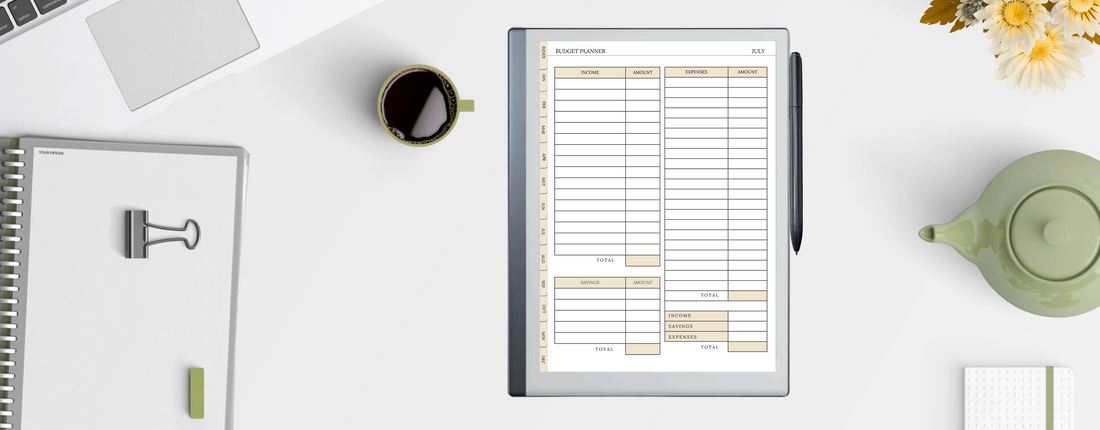
It's a minimalist, month-by-month system designed to help you stay consistent and in control of your finances — without relying on noisy apps or cluttered spreadsheets.
🔍 What’s Inside the Budget Planner
Let’s break it down:
🗂️ 12 Monthly Sections — From January to December, each month has:
- A full-page budget planner
- A themed saving challenge
- A detailed debt tracker
📌 Tap-to-Jump Navigation — No scrolling forever. Jump to any month instantly.
🧾 Income / Expense / Savings Columns — Log every major transaction and see your totals at a glance.
📉 Reflection-Friendly Layout — It’s easy to check in and adjust each month.
If you’re left-handed: yes, we thought of you too — there's a left-handed version so tabs don’t get in your way.
💡 5 Smart Ways to Use Your Template
Whether you’ve opened it or not, here’s how to get started — and stick with it:
1. Start in the Current Month
Forget waiting for a “perfect” month to begin. Tap into the current one and start logging income + expenses. Done is better than perfect.
2. Use the Saving Challenge
Each month includes a simple challenge (like no-spend weekends or envelope-style goals). Treat it like a game — it makes saving more fun.
3. Use the Debt Tracker Honestly
No shame, no fluff. Write it all down — balances, interest rates, due dates. You’ll feel more in control just by seeing it clearly.
4. Weekly Budget Review
Every Sunday night, do a quick check-in. Update expenses, total your savings, and mark anything non-essential with a ⚠️. That’s your “leak.”
5. Customize Your Categories
Change generic headers like “Miscellaneous” to something personal: “Freelance Tools,” “School Fees,” “Self-Care.” The more relevant, the more useful.
🛒 Haven’t Downloaded It Yet?
This template is made for real people — freelancers, families, side-hustlers, anyone trying to get a grip on spending.
And it’s not an app with monthly fees. It’s a one-time download designed for your reMarkable — clean, practical, beautiful.
👉 Get the Budget Planner Template Now
Already Using It?
We love seeing how you personalize your templates — tag us on Instagram or reply to this email and show us your setup.
Budgeting doesn’t have to feel like punishment.
With the right layout, it becomes a habit — and one you’ll actually enjoy.
